
Finding the best crypto wallet is one of the most important steps for anyone starting in the world of digital assets. There are many best crypto wallets for beginners are many options, and each wallet offers different features. Some people prefer mobile apps like Trust Wallet, while others look for hardware wallets for extra safety.
In this guide, we will cover the Top 18 crypto wallets, explain how they work, and help you pick the right option for your needs. This list of crypto wallets is made to give clear details about security, usability, and support so you can choose the best crypto wallet 2025 based on your personal goals. Whether you want a simple wallet app or a more advanced setup, this blog will make the selection process easy.
Types of Crypto Wallets
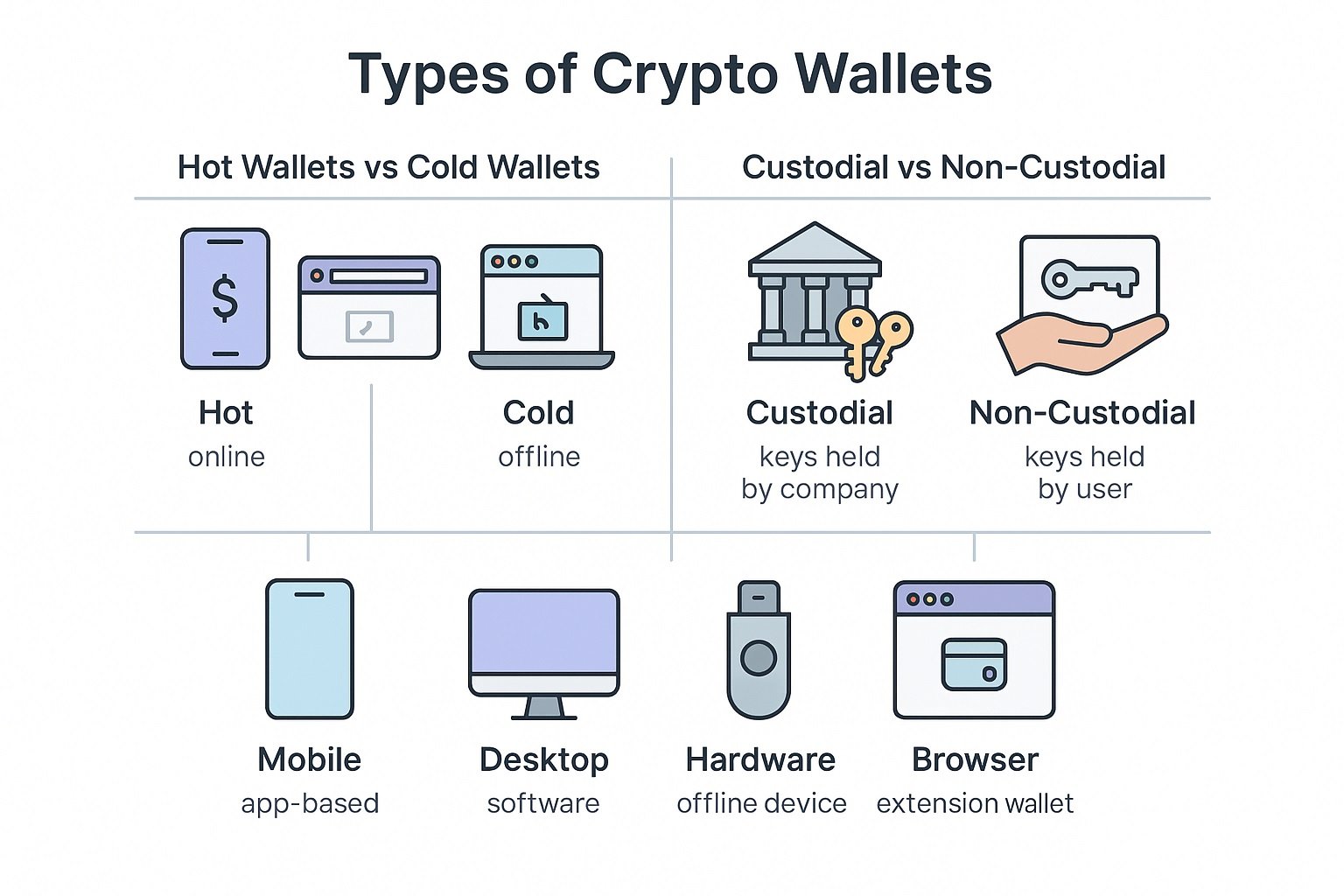
Before choosing the best crypto wallet, it helps to understand the main types of crypto wallets. Each type works in a different way and is made for a different use case. Below is a simple breakdown of the most common types of crypto wallets.
Hot Wallets vs Cold Wallets
- Hot wallets are connected to the internet. These include mobile wallets, web wallets, and browser extension wallets. They are easy to use for daily transfers, DeFi, and trading. Because they stay online, they are more open to online risks, so they are best for small to medium amounts.
- Cold wallets are offline wallets, mainly hardware wallets or paper wallets. They do not stay connected to the internet, which makes them safer for long-term holding and large amounts of crypto. You plug them in or use them only when you need to sign a transaction.
Custodial vs Non-Custodial Wallets
- Custodial wallets are wallets where a company or exchange holds your private keys for you. You log in with an email or phone and password, and the platform manages the keys in the background. This is simple for beginners, but you do not have full control over your funds.
- Non-custodial wallets give you full control of your private keys. You get a recovery phrase or a special backup method. No one else can move your funds, but you are also fully responsible for your backup. If you lose your recovery phrase and access, you may not be able to get your funds back.
Mobile, Desktop, Hardware, and Browser Wallets
- Mobile wallets are apps you install on your phone. They are good for daily use, quick payments, DeFi, NFTs, and small to medium holdings. Examples: Trust Wallet, MetaMask (mobile), Exodus app.
- Desktop wallets are programs you install on your computer. They often give more control and tools for advanced users. Examples: Electrum (for Bitcoin), Exodus desktop.
- Hardware wallets are physical devices that store private keys offline. They are one of the safest ways to store crypto for the long term. Examples: Ledger, Trezor, Cypherock.
- Browser wallets are extensions you add to browsers like Chrome or Firefox. They are used a lot for web3 and DeFi because they connect directly to sites. Example: MetaMask browser extension, Phantom for Solana.
When you know these main types of crypto wallets, it becomes easier to read any list of wallets and decide which one fits your needs, risk level, and budget.
How to Choose the Best Crypto Wallet for Your Needs
Choosing the best crypto wallet depends on your goals, experience level, and the type of assets you plan to store. Every wallet offers different strengths, so it is important to understand what you need before making a decision. Below are the key points to help you pick the right wallet.
1. Security Matters the Most
The first thing to check is how the wallet handles security. If you want full control of your funds, a non-custodial wallet is the better choice because you keep your own private keys. For long-term storage, hardware wallets provide strong offline protection. If you prefer something simple, custodial wallets managed by exchanges may be easier, but you do not control the keys. Always look for options like biometrics, recovery phrases, or safe backup methods.
2. Coins and Network Support
Some wallets support only one network, like Bitcoin wallets or Ethereum wallets, while others allow you to manage many tokens across different blockchains. If you plan to use DeFi apps or hold tokens from multiple chains, make sure the wallet supports all the assets you need. Multi-chain wallets such as Trust Wallet or Coinbase Wallet are good for users who want flexibility.
3. Fees and Charges
Wallets do not usually charge for creating or keeping an account, but network fees apply when sending crypto. Some wallets also charge extra for swaps or buying crypto inside the app. If you want low-cost transfers, check how easy it is to adjust network fees. For users in India, on-ramp fees (buying crypto using INR) may also vary depending on the platform you use.
4. Ease of Use for Beginners
If you are new to crypto, choose a wallet with a clean layout and simple setup. Mobile wallets like Trust Wallet, Zengo, and Exodus are easy for beginners. Advanced users who want detailed control of fees, multi-signature options, or custom networks may prefer wallets like MetaMask or Electrum.
5. Choose Based on Your Use Case
The best wallet for you depends on how you plan to use it.
If you want to trade daily, a custodial exchange wallet is simple.
If you want to store funds for a long time, hardware wallets like Ledger or Trezor are safer.
If you want to use DeFi or NFTs, browser wallets like MetaMask or Phantom are ideal.
For Indian users, mobile wallets with multi-chain support are common choices because they work well across different apps.
When you understand your needs, it becomes much easier to select the wallet that fits your goals and provides the right balance between safety, convenience, and features.
Best Crypto Wallets for Beginners
If you are new to crypto, you need a wallet that is simple, safe, and easy to understand. Beginner-friendly wallets focus on a clean layout, smooth setup, and basic tools that help you send or receive crypto without confusion. For most new users, mobile wallets work best because they are quick to set up and do not require advanced settings.
- Coinbase Wallet is popular among beginners because it supports many coins and connects easily with apps.
- Trust Wallet is another simple option with a clear layout and smooth mobile experience.
- Exodus offers both mobile and desktop versions, giving new users more comfort and flexibility.
- Zengo is also beginner-friendly because it removes recovery phrases and uses a simple backup method.
These wallets are ideal for anyone who wants a smooth start without learning complex tools.
Best Crypto Wallets in India (2025)
Crypto users in India look for wallets that support common coins, offer smooth mobile access, and work well with Indian exchanges and apps. For daily use, mobile wallets are the most common choice because they work smoothly on Android and iOS.
- Binance Wallet is widely used in India for basic storage and quick transfers inside the exchange.
- Trust Wallet is a strong option because it supports many networks and works without needing an exchange account.
- Coinbase Wallet is also suitable for Indian users who want a multi-chain wallet for DeFi and NFTs. If users want extra safety, Ledger and Trezor are trusted hardware options for long-term holding.
These wallets offer the right mix of safety, flexibility, and ease for Indian users in 2025.
18 Best Crypto Wallets to Use in 2025
1. Coinbase Wallet

Coinbase Wallet is a non-custodial, mobile cryptocurrency wallet that allows users to store, manage, and interact with their digital assets, including cryptocurrencies and NFTs. Formerly known as Coinbase Wallet, it is now also referred to as the Base app, which provides full control over private keys. It supports a wide range of digital assets, includes a built-in decentralized app browser for interacting with DeFi and other apps, and allows users to send and receive crypto globally.
Key Features and Functions
- Self-custody: Coinbase Wallet is non-custodial, which means you have full control over your private keys, and your funds are not held by any third party.
- Asset management: It supports Bitcoin, Ethereum, and thousands of other tokens and NFTs across blockchains such as Polygon, Avalanche, and BNB Chain.
- dApp browser: It includes a decentralized app browser for smooth use of DeFi protocols, decentralized exchanges, and other web3 apps.
- Peer-to-peer transfers: You can send and receive crypto directly to and from other users without involving a financial service.
- Global access: The wallet can be used to send and receive crypto from anywhere in the world.
User-friendly interface: Its simple layout makes it easy to handle digital assets and use different apps.
How It Differs From the Main Coinbase App
- Coinbase app: This app is custodial, and Coinbase manages your private keys. It is mainly for buying, selling, and exchanging crypto with fiat currency. It suits users who want simple investing without needing access to decentralized apps.
- Coinbase Wallet (Base app): This is a separate non-custodial app that gives you full control of your keys and access to the wider web3 world, including dApps, DeFi, and NFTs. You do not need a Coinbase account to use the Wallet app.
How to Get Started
- Download the app: Install it from the Google Play Store or Apple App Store.
- Create a new wallet: Select “Create a new wallet.”
- Set a username: Choose a username for easier transaction tracking.
- Secure your wallet: Set a passcode or biometrics and back up your wallet either to the cloud or by writing down your recovery phrase.
- Fund your wallet: Buy crypto through the app or transfer it from another wallet or exchange.
2. MetaMask Wallet

MetaMask is a non-custodial crypto wallet used for storing and managing digital assets, mainly on the Ethereum network. It works as a mobile app and a browser extension, allowing users to access their crypto from both phone and desktop. It is widely used for interacting with web3 apps, DeFi platforms, and NFT marketplaces. MetaMask gives full control over private keys, which stay on the user’s device, and it supports many Ethereum-based tokens along with several other networks through manual network setup.
Key Features and Functions
- Self-custody: MetaMask is non-custodial, so users hold their own private keys and stay in control of their funds at all times.
- Asset management: It supports ETH and thousands of ERC-20, ERC-721, and ERC-1155 tokens. It also allows adding networks like Polygon, BNB Chain, and Avalanche through simple settings.
- dApp access: MetaMask has direct connections to DeFi platforms, NFT sites, and many other web3 apps through its built-in connection system.
- Token swaps: Users can swap tokens inside the wallet without using an exchange.
- Network flexibility: Extra networks can be added easily, giving access to more apps and tokens.
- Mobile and extension: It works on Android, iOS, and all major browsers, so users can switch between devices smoothly.
How It Differs From the Main Crypto Exchanges
- Crypto exchanges: Centralized exchanges store user funds and private keys, and are mainly used for buying, selling, and trading crypto. They are easier for beginners who only want simple transactions.
- MetaMask wallet: MetaMask is non-custodial and focuses on giving full control to the user. It is made for handling tokens, using web3 apps, joining DeFi platforms, trading NFTs, and connecting to decentralized services. You do not need an exchange account to use MetaMask.
How to Get Started
- Download the app: Install MetaMask from the Google Play Store, Apple App Store, or add the browser extension.
- Create a new wallet: Choose “Create a new wallet” and follow the setup steps.
- Secure your wallet: Set a strong passcode or biometrics and write down your recovery phrase in a safe place.
- Add networks if needed: Ethereum is added by default, and you can add networks like Polygon or BNB Chain manually.
- Fund your wallet: Transfer crypto from another wallet or exchange, or buy directly through the app in supported regions.
3. Trezor Wallet

Trezor Wallet is a hardware wallet made for storing and securing digital assets offline. It gives users full control over their private keys by keeping them inside a physical device instead of a phone or computer. This reduces the chance of online risks and makes it one of the safest ways to store crypto. Trezor works with the Trezor Suite app, which lets users manage coins, check balances, and send or receive crypto through a simple dashboard.
Key Features and Functions
- Self-custody: Trezor is fully non-custodial. Your private keys never leave the device and are not shared with any online service.
- Asset management: It supports Bitcoin, Ethereum, and many other popular coins and tokens across different networks. Users can store, send, and receive assets through the Trezor Suite app.
- Offline security: All signing happens inside the hardware device, so even if a computer is infected, the keys remain safe.
- Compatibility: Trezor works with many apps such as MetaMask, Exodus, and other web3 tools for managing tokens and interacting with crypto services.
- Recovery setup: The device provides a recovery phrase that can be used to restore the wallet if the device is lost or damaged.
- User interface: Trezor Suite has a clean layout that shows balances, transaction history, and portfolio details in an easy format.
How It Differs From Software Wallets
- Software wallets: Mobile or browser wallets store private keys on the device, and they rely on internet-connected systems. They are simple to use but more open to online threats.
- Trezor hardware wallet: The private keys stay offline inside the device. This gives a higher level of protection and is ideal for storing large amounts of crypto or long-term savings. Trezor does not require any exchange account, and users stay in full control of their keys.
How to Get Started
- Buy the device: Order a Trezor device from the official website or an approved seller.
- Connect the device: Plug it into your computer and open the Trezor Suite app.
- Create a new wallet: Follow the on-screen steps to set up the device and create your wallet.
- Secure your wallet: Write down your recovery phrase and keep it safe. This is needed if the device is lost.
- Fund your wallet: Send crypto from another wallet or exchange into the new Trezor address shown in the app.
4. Exodus Wallet

Exodus is a non-custodial software wallet made for storing and managing digital assets on both mobile and desktop. It is known for its clean layout and simple controls, which make it easy for new users to handle crypto. Since it is non-custodial, all private keys stay with the user. Exodus supports many coins and tokens, and it also connects with apps inside its system for extra functions like staking and swapping.
Key Features and Functions
- Self-custody: Exodus is non-custodial, so private keys stay on the user’s device, giving full control of the funds.
- Asset management: It supports Bitcoin, Ethereum, and hundreds of other coins and tokens across many networks. Users can view their full balance and track their portfolio in one place.
- Built-in swaps: The wallet allows token swaps inside the app without using an external exchange.
- Staking support: Some assets can be staked directly in the wallet for passive rewards.
- Desktop and mobile: Exodus works on Windows, Mac, Linux, Android, and iOS, and users can sync their devices if needed.
- Trezor support: It can connect with Trezor hardware wallets for added safety while using the Exodus interface.
- NFT support: On supported networks, users can view and manage NFTs inside the app.
How It Differs From Exchange Wallets
- Exchanges: Exchange wallets hold private keys on behalf of the user. They are good for trading but not ideal for long-term storage.
- Exodus wallet: Exodus gives full control to the user and stores the keys locally. It is made for daily management, swaps, staking, and tracking assets without relying on a centralized service.
How to Get Started
- Download the app: Install Exodus from the official website or app stores.
- Create a new wallet: Open the app and allow it to generate a new wallet for you.
- Secure your wallet: Back up your recovery phrase and store it in a safe location.
- Sync if needed: Connect your desktop and mobile app using the secure sync option.
- Fund your wallet: Transfer crypto from another wallet or exchange, or use the buy option inside the app if it is supported in your region.
5. Trust Wallet
Trust Wallet is a non-custodial mobile wallet used for storing and managing a wide range of digital assets. It is the official mobile wallet for Binance but works independently and does not require a Binance account. Since it is non-custodial, users stay in full control of their private keys. Trust Wallet supports many networks and tokens, making it a common choice for people who want an easy way to manage coins, tokens, and NFTs directly from their phone.
Key Features and Functions
- Self-custody: Trust Wallet gives users full control of their private keys, which remain stored on the device.
- Asset management: It supports Bitcoin, Ethereum, BNB, Solana, and many other network tokens. Users can view and manage their entire portfolio inside the app.
- dApp browser: The wallet has a built-in browser for connecting to DeFi platforms, NFT sites, and other web3 apps.
- Token swaps: Users can swap supported tokens inside the app without visiting an exchange.
- Staking options: Some networks offer staking inside the wallet, allowing users to earn passive rewards.
- NFT support: Trust Wallet allows users to view and manage NFTs on supported networks.
- Mobile-first design: It works on Android and iOS, with a simple layout suited for beginners and daily users.
How It Differs From Exchange Wallets
Exchange wallets: Private keys are stored by the exchange, and users do not have direct access to them. These wallets are mostly for buying and trading.
Trust Wallet: It is non-custodial, and all private keys stay with the user. The app is focused on holding assets, using dApps, swapping tokens, and managing NFTs without needing a centralized platform.
How to Get Started
- Download the app: Install Trust Wallet from the Google Play Store or Apple App Store.
- Create a new wallet: Open the app and select “Create a new wallet.”
- Secure your wallet: Write down the recovery phrase and store it safely. This phrase is needed to restore the wallet.
- Enable dApp browser if needed: On Android, it is built-in. On iOS, access may vary by region.
- Fund your wallet: Send crypto from an exchange or another wallet, or buy supported tokens directly through the app in eligible regions.
6. Ledger Wallet

Ledger is a hardware wallet designed to keep digital assets safe by storing private keys inside a physical device instead of an online system. This gives a higher level of protection compared to software wallets. Ledger works with the Ledger Live app, which allows users to check balances, send and receive crypto, and manage their portfolio through a clean interface. It is commonly used by people who want strong security for long-term storage.
Key Features and Functions
- Self-custody: Ledger is fully non-custodial. Private keys stay inside the hardware device and never move to a phone or computer.
- Asset management: It supports Bitcoin, Ethereum, and many other network tokens. Users can manage coins, tokens, and some NFTs through Ledger Live.
- Offline protection: The device signs transactions inside the hardware unit, which helps protect the keys even if the computer has issues.
- Ledger Live app: This app provides a dashboard for checking balances, sending and receiving funds, staking supported assets, and tracking activity.
- Compatibility: Ledger works with apps like MetaMask, giving users access to many web3 platforms while keeping keys inside the hardware unit.
- Recovery setup: During setup, the device provides a recovery phrase. This can be used to restore the wallet on a new device if the original one is lost or damaged.
How It Differs From Software Wallets
- Software wallets: These store private keys on the device and are easy to use, but they stay connected to online systems.
- Ledger hardware wallet: Ledger keeps private keys offline inside the hardware device. This gives a safer option for people holding large amounts of crypto or planning long-term storage. Ledger does not require any exchange account, and users stay in complete control of their keys.
How to Get Started
- Buy the device: Purchase a Ledger device from the official website or a trusted seller.
- Connect and set up: Plug the device into your computer and open the Ledger Live app.
- Create a new wallet: Follow the steps shown on the device screen to set up your wallet.
- Secure your wallet: Write down the recovery phrase and store it in a safe place.
- Fund your wallet: Send crypto from another wallet or exchange to the Ledger address shown in Ledger Live.
7. Zengo Wallet
Zengo is a mobile crypto wallet that focuses on safety and ease of use. It is different from normal wallets because it does not use a recovery phrase. Instead, it uses advanced key-sharing security to protect the wallet. Zengo is non-custodial, which means users stay in control of their funds, but the setup is simpler than traditional seed phrase wallets. It works on both Android and iOS and supports many popular coins and tokens, along with basic web3 features.
Key Features and Functions
- Keyless security: Zengo does not use a seed phrase. It uses a special key-sharing system where the security is split between the user’s device and Zengo’s server. Both parts are needed to unlock the wallet, which reduces the chance of losing access.
- Asset management: It supports Bitcoin, Ethereum, Polygon, and other major networks and tokens. Users can store, send, and receive assets through the app.
- dApp connection: Zengo offers web3 access through WalletConnect, allowing users to connect to DeFi apps, NFT platforms, and other services.
- Recovery backup: Since there is no seed phrase, users back up the wallet using secure facial recognition and their email. This makes recovery simple even for beginners.
- Built-in services: The app supports swaps, buying crypto in selected regions, and earning rewards on supported assets.
- Mobile-first design: Zengo is made for phone users, with a simple layout and smooth controls.
How It Differs From Regular Wallets
- Standard wallets: Most non-custodial wallets use a recovery phrase. If the phrase is lost, access to the wallet is lost forever.
- Zengo wallet: Zengo removes the recovery phrase and uses a key-sharing method instead. This lowers the risk of losing access while still keeping users in control of their funds. It is built for people who want safety without dealing with seed phrase storage.
How to Get Started
- Download the app: Install Zengo from the Google Play Store or Apple App Store.
- Create your wallet: Open the app and follow the steps to set up a new wallet.
- Secure the wallet: Complete the backup process using facial recognition and your email.
- Connect if needed: Use WalletConnect to access web3 apps from inside the app.
- Fund your wallet: Transfer crypto from another wallet or exchange, or buy inside the app if available in your region.
8. Electrum Wallet
Electrum is a long-running Bitcoin wallet known for speed, stability, and strong security. It is a non-custodial wallet, so users stay in full control of their private keys. Electrum is made mainly for desktop, but it also has a mobile version. It focuses only on Bitcoin, which helps keep the app fast and light. It is used by people who want full control of their BTC with advanced settings.
Key Features and Functions
- Self-custody: Electrum is non-custodial, and private keys stay on the user’s device.
- Bitcoin-only wallet: Electrum handles Bitcoin only. This makes it simple and focused for BTC users.
- Speed: The wallet connects to fast servers that keep the app quick and responsive.
- Advanced settings: Users can set custom fees, use hardware wallets, create multi-signature wallets, and handle detailed transaction controls.
- Recovery phrase: During setup, the app gives a recovery phrase that can be used to restore the wallet.
- Lightweight design: Because it uses remote servers instead of downloading the full blockchain, it installs quickly and uses minimal space.
How It Differs From Multi-Coin Wallets
- Multi-coin wallets: These support many tokens and networks, and often include features like swaps and NFT support.
- Electrum wallet: Electrum is focused only on Bitcoin. It is built for users who want speed, fine control over their BTC transactions, and a wallet that avoids extra features they may not need.
How to Get Started
- Download the app: Install Electrum from the official website or app store.
- Create a new wallet: Choose “Standard wallet” or select other options if you want advanced setups.
- Secure your wallet: Write down the recovery phrase and store it in a safe place.
- Set your preferences: Adjust fee settings or connect to a custom server if needed.
- Fund your wallet: Send Bitcoin from another wallet or exchange to the address generated by Electrum.
9. SafePal Wallet

SafePal is a crypto wallet that offers both a mobile app and a hardware wallet. It is designed for users who want safe storage along with easy access to their digital assets. SafePal is non-custodial, so users stay in full control of their private keys. The wallet supports many networks and tokens, and it works with the SafePal app for managing assets, tracking balances, and sending or receiving crypto.
Key Features and Functions
- Self-custody: SafePal keeps private keys under the user’s control. The keys stay inside the hardware device or the app, depending on which version you use.
- Asset management: It supports Bitcoin, Ethereum, BNB, Solana, and many other network tokens. Users can manage all assets inside the SafePal app.
- Hardware wallet: SafePal’s hardware wallet works without Bluetooth or Wi-Fi. It uses QR codes for signing, which helps keep keys safe from online issues.
- dApp access: The mobile app includes access to DeFi platforms, NFT markets, and other web3 services through built-in tools.
- Token swaps: Users can swap supported tokens inside the app.
- Staking support: Some networks allow staking inside SafePal, giving users a way to earn rewards.
- Cross-platform use: SafePal works on Android, iOS, and supports both software and hardware setups.
How It Differs From Regular Mobile Wallets
- Regular wallets: These store private keys on the phone and depend mainly on software protection.
- SafePal wallet: SafePal offers both a hardware wallet and a mobile app. The hardware wallet gives offline protection, while the app provides everyday access. This setup helps users choose between convenience and extra safety based on their needs.
How to Get Started
- Download the app: Install SafePal from the Google Play Store or Apple App Store.
- Set up your wallet: Choose between creating a software wallet or linking a SafePal hardware wallet.
- Secure your wallet: Write down the recovery phrase and store it safely.
- Connect if using hardware: Pair the hardware wallet by following the QR code instructions inside the app.
- Fund your wallet: Transfer crypto from another wallet or exchange to your SafePal address.
10. Bitcoin Wallet

Bitcoin Wallet is a simple and direct mobile wallet made for people who want an easy way to store and send Bitcoin. It focuses only on BTC, which keeps the app light and simple for beginners. The wallet is non-custodial, so users remain in full control of their private keys. It has a clean interface, fast setup, and basic tools needed for daily Bitcoin use.
Key Features and Functions
- Self-custody: The wallet is non-custodial, and private keys stay on the user’s device.
- Bitcoin-only focus: It supports only BTC, which helps keep the app secure and easy to use.
- Simple layout: The app shows balances, history, and receiving options in a clean format.
- Fast transactions: Users can send and receive Bitcoin quickly with clear fee settings.
- Recovery phrase: A recovery phrase is provided during setup, which can restore the wallet if needed.
- Lightweight design: The app does not require heavy downloads and works smoothly on most devices.
How It Differs From Multi-Coin Wallets
- Multi-coin wallets: These support many tokens and networks, and often come with extra tools like swaps or dApp access.
- Bitcoin Wallet: This wallet is focused only on Bitcoin. It avoids extra features and keeps the experience simple for BTC users who only need basic transactions and storage.
How to Get Started
- Download the app: Install the Bitcoin Wallet app from the Google Play Store or Apple App Store.
- Create a wallet: Open the app and allow it to set up a new Bitcoin wallet.
- Secure your wallet: Write down the recovery phrase in a safe place.
- Receive Bitcoin: Copy your receiving address and use it to receive BTC from another source.
- Send Bitcoin: Enter the address, choose the fee, and confirm the transaction.
11. Crypto.com Wallet

Crypto.com Wallet is a non-custodial mobile wallet made for users who want full control of their private keys along with access to a large range of digital assets. It is separate from the main Crypto.com app, which is custodial. The wallet supports many coins and tokens, offers smooth transfers, and connects easily to web3 apps. It works on both Android and iOS and is designed for people who want safe storage with flexible crypto tools.
Key Features and Functions
- Self-custody: Crypto.com Wallet gives users full control of their private keys, which stay on their device.
- Asset management: The wallet supports Bitcoin, Ethereum, and many other network tokens. Users can store, send, receive, and manage all assets inside the app.
- dApp access: It offers web3 access through WalletConnect, allowing users to connect to DeFi platforms, NFT sites, and other crypto services.
- Token swaps: Users can swap supported tokens inside the app with simple steps.
- Security setup: The wallet uses a recovery phrase for backup and allows extra security options like biometrics.
- Smooth design: The app has a clean layout that helps beginners understand their balance, history, and transaction details.
How It Differs From the Main Crypto.com App
- Crypto.com App: This is custodial. The platform handles private keys and focuses on buying, selling, and trading crypto with fiat currency.
- Crypto.com Wallet: This wallet is non-custodial. Users hold their own keys and have access to web3 apps, tokens, and other tools that do not depend on the main exchange.
How to Get Started
- Download the app: Install the Crypto.com Wallet app from the Google Play Store or Apple App Store.
- Create your wallet: Open the app and choose to create a new wallet.
- Secure your wallet: Write down your recovery phrase and store it safely.
- Enable protection: Add biometrics or a passcode for extra safety.
- Fund your wallet: Transfer crypto from another wallet or exchange, or connect through WalletConnect to use web3 apps.
12. Ethereum Wallet
An Ethereum wallet is a non-custodial tool made for storing and managing assets built on the Ethereum network. It is used to hold ETH and thousands of ERC-20 and ERC-721 tokens. Users stay in full control of their private keys, which makes it safe for handling digital assets. Ethereum wallets come in different forms such as mobile apps, browser extensions, and hardware devices, but all of them are made to help users send, receive, and simply manage ETH.
Key Features and Functions
- Self-custody: Ethereum wallets keep private keys with the user, giving complete control over funds.
- Support for ETH and tokens: Users can store ETH along with many ERC-20 tokens and NFTs built on the Ethereum network.
- dApp access: Most Ethereum wallets connect smoothly to DeFi platforms, NFT markets, and other web3 services through WalletConnect or built-in tools.
- Transaction control: Users can send and receive ETH, adjust gas fees, and track activity directly inside the wallet.
Recovery phrase: A recovery phrase is given during setup, which can restore the wallet on any device. - Flexible options: Ethereum wallets are available on mobile, desktop, browser, and hardware devices, so users can pick whatever suits their needs.
How It Differs From Multi-Chain Wallets
- Multi-chain wallets: These support many networks such as BNB Chain, Polygon, Solana, and others.
- Ethereum wallet: This type focuses mainly on Ethereum and its tokens. It simplifies the experience for users who only work with ETH and Ethereum-based apps.
How to Get Started
- Choose a wallet: Pick an Ethereum wallet such as MetaMask, Trust Wallet, Ledger, or any other Ethereum-compatible option.
- Install or set up: Download the app, add the browser extension, or set up your hardware device.
- Create a wallet: Follow the steps to create a new Ethereum wallet.
- Secure your wallet: Write down your recovery phrase and store it safely.
- Fund your wallet: Send ETH or tokens from another wallet or exchange. You can also connect to web3 apps using WalletConnect or similar tools.
13. Kraken Wallet

Kraken Wallet is the non-custodial crypto wallet offered by Kraken for users who want full control of their private keys while still enjoying a simple way to manage digital assets. It is separate from the main Kraken exchange, which is custodial. Kraken Wallet works as a mobile app and supports many popular coins and tokens. It is designed for users who want safe storage, smooth transfers, and a simple layout without depending on an exchange to hold their funds.
Key Features and Functions
- Self-custody: Kraken Wallet keeps private keys with the user, not with the exchange. This gives full control over funds and adds an extra layer of safety.
- Asset management: It supports Bitcoin, Ethereum, and many other tokens across supported networks. Users can check balances, send and receive assets, and manage holdings easily.
- Web3 access: The wallet can connect to different web3 apps through WalletConnect, giving access to DeFi platforms, NFT sites, and other crypto tools.
- Security setup: Users secure their wallet with a recovery phrase and can add biometrics or a passcode for extra protection.
- Simple layout: The app has a clean interface made for both new and experienced users, with clear transaction steps and easy navigation.
Independent from the exchange: You do not need a Kraken exchange account to use the wallet.
How It Differs From the Kraken Exchange App
- Kraken exchange: This is custodial, meaning the platform handles private keys. It is made for buying, selling, and trading crypto with advanced tools and order types.
- Kraken Wallet: This is non-custodial. Users hold their own keys and manage their assets directly. It focuses on storage, transfers, and connecting to web3 apps rather than trading.
How to Get Started
- Download the app: Install Kraken Wallet from the Google Play Store or Apple App Store.
- Create a new wallet: Open the app and follow the setup steps to generate your non-custodial wallet.
- Secure your wallet: Write down the recovery phrase and store it safely.
- Add protection: Enable biometrics or a passcode for extra safety.
- Fund your wallet: Transfer crypto from another wallet or exchange. You can also connect to web3 apps using WalletConnect.
14. Binance Wallet
Binance Wallet is the built-in wallet used inside the Binance exchange for storing and managing digital assets. It is a custodial wallet, which means Binance holds the private keys on behalf of the user. This setup makes it easy for beginners to handle crypto without dealing with seed phrases or complex steps. The wallet supports a large range of coins and tokens and is available through the Binance app and website. It is mainly used for trading, deposits, withdrawals, and simple storage.
Key Features and Functions
- Custodial wallet: Binance controls the private keys, allowing users to access their assets with just a login.
- Wide asset support: It supports Bitcoin, Ethereum, BNB, and hundreds of other tokens across many networks.
- Trading access: Users can trade directly from the wallet using Binance trading tools.
- Staking and rewards: Many assets can be staked or locked to earn rewards inside the Binance ecosystem.
- Simple transfers: The wallet supports fast deposits and withdrawals to and from other wallets.
- Security tools: Users can enable 2FA, biometrics, and withdrawal protection to secure their account.
- Smooth interface: The layout is clear, making it easy for beginners to manage crypto and view their balance.
How It Differs From Non-Custodial Wallets
- Non-custodial wallets: These give full control of private keys to the user and often require seed phrases.
- Binance Wallet: This wallet is custodial. Binance manages private keys, which removes the need for seed phrases and helps beginners avoid mistakes. It is built mainly for trading, quick transfers, and daily use inside the exchange.
How to Get Started
- Create a Binance account: Sign up on the Binance app or website.
- Verify your account: Complete identity verification if required in your region.
- Access the wallet: Open the “Wallet” section to view your balances and supported assets.
- Deposit funds: Add crypto or fiat money to your Binance account.
- Use features: Trade, stake, or transfer funds based on your needs.
15. BlueWallet

BlueWallet is a non-custodial Bitcoin wallet made for users who want a clean and simple way to manage their BTC. It works on both Android and iOS and focuses only on Bitcoin, which keeps the app light and easy to understand. BlueWallet supports normal BTC wallets and the Lightning Network, giving users fast and low-fee payments when needed. Since it is non-custodial, users stay in full control of their private keys.
Key Features and Functions
- Self-custody: Private keys stay on the user’s device, giving full control of all funds.
- Bitcoin-only focus: BlueWallet supports only Bitcoin and Lightning, which helps keep the app simple and fast.
- Lightning support: Users can create Lightning wallets for quick and low-fee payments.
- Easy backups: The wallet provides a recovery phrase to restore the wallet if needed.
- Multi-wallet setup: Users can create different BTC wallets inside the app for better organization.
- Clean layout: The design is simple, showing balances, transfers, and transaction details in a clear format.
- Watch-only mode: Users can track balances from another wallet without exposing private keys.
How It Differs From Multi-Coin Wallets
- Multi-coin wallets: These support many networks and often come with more tools like swaps or NFT features.
- BlueWallet: This app focuses only on Bitcoin. It avoids extra features and gives BTC users a smooth and easy experience, especially for people who want strong control over their BTC or want to use the Lightning Network.
How to Get Started
- Download the app: Install BlueWallet from the Google Play Store or Apple App Store.
- Create a new wallet: Open the app and choose to create a Bitcoin or Lightning wallet.
- Secure your wallet: Write down the recovery phrase and keep it in a safe place.
- Add funds: Send Bitcoin from another wallet or exchange to your BlueWallet address.
- Use Lightning (optional): Create a Lightning wallet if you want faster and lower-fee payments.
16. Cypherock Wallet

Cypherock is a hardware wallet designed to store digital assets with strong offline protection. It uses a unique system where the private key is split into multiple parts and stored across different physical cards. This removes the need for a recovery phrase and lowers the chance of losing access. Cypherock works with the Cypherock X1 device and mobile app, allowing users to send, receive, and manage crypto while keeping their keys safe.
Key Features and Functions
- Self-custody: Cypherock gives full control of private keys by keeping them offline and divided across several cards.
- No recovery phrase: Instead of a seed phrase, the wallet uses a key-splitting system that stores parts of the key on different NFC cards.
- Asset management: Users can store Bitcoin, Ethereum, and many other tokens supported through the Cypherock app.
- Offline safety: The device keeps the key parts offline, reducing the risk of online threats.
- Multiple cards: Cypherock provides several cards that hold different parts of the key. A set number of cards are required to sign a transaction.
- Secure app: The mobile app allows users to view balances, transfer funds, and check activity while keeping sensitive data inside the hardware.
How It Differs From Other Hardware Wallets
- Other hardware wallets: Most of them use a recovery phrase to restore access. Losing the phrase can lead to permanent loss of funds.
- Cypherock wallet: Cypherock removes the need for a seed phrase and uses split-key storage. This helps users avoid the stress of writing or storing a long phrase, while still keeping control of their assets.
How to Get Started
- Buy the device: Order Cypherock X1 from the official website or a trusted seller.
- Set up the wallet: Follow the on-screen steps to split your key and save it across the NFC cards.
- Secure your cards: Store the cards in safe locations so you always have access to the needed combination.
- Install the app: Download the Cypherock app on your phone and connect it to the device.
- Fund your wallet: Send crypto from another wallet or exchange to the addresses shown in the app.
17. Mycelium Wallet

Mycelium is a non-custodial Bitcoin wallet made for users who want strong control and advanced tools for handling BTC. It has been in the crypto space for many years and is known for speed, stability, and a simple layout. Mycelium works mainly on mobile devices and focuses only on Bitcoin, which keeps the app clean and easy to use. Since it is non-custodial, all private keys stay with the user.
Key Features and Functions
- Self-custody: Mycelium keeps private keys on the user’s device, giving full control of all funds.
- Bitcoin-only focus: The wallet supports only Bitcoin, which helps keep the app light and fast.
- Advanced tools: Users can set custom fees, use different account types, and manage their BTC with more control.
- Hardware wallet support: Mycelium can connect with hardware wallets like Ledger and Trezor for extra safety.
- Local trader feature: The app includes a simple system for finding nearby Bitcoin buyers or sellers in supported regions.
- Fast setup: The app loads quickly, and the interface shows balances and transfers clearly.
- Recovery phrase: Users get a recovery phrase to restore the wallet if needed.
How It Differs From Multi-Coin Wallets
- Multi-coin wallets: These support many networks and tokens and include extra features like swaps or NFTs.
- Mycelium wallet: Mycelium stays focused on Bitcoin only. This keeps the app simple and stable for users who want a direct and reliable BTC wallet.
How to Get Started
- Download the app: Install Mycelium from the Google Play Store or Apple App Store.
- Create a new wallet: Open the app and let it generate your Bitcoin wallet.
- Secure your wallet: Write down your recovery phrase and store it safely.
- Adjust settings: Set your fee preferences and choose your wallet type if needed.
- Fund your wallet: Send Bitcoin from another wallet or exchange to your Mycelium address.
18. Solana Wallet
A Solana wallet is a non-custodial wallet made for storing and managing assets built on the Solana network. It is used to hold SOL, SPL tokens, and NFTs on the Solana chain. Users stay in full control of their private keys, which makes it safe for handling digital assets. Solana wallets come in mobile, browser, desktop, and hardware versions. They are designed to offer fast transactions, low fees, and smooth access to apps built on Solana.
Key Features and Functions
- Self-custody: Solana wallets store private keys on the user’s device, giving full control over funds.
- SOL and SPL token support: Users can store SOL, SPL tokens, and Solana-based NFTs.
- Fast transactions: The Solana network is known for quick and low-fee transfers, which makes the wallet experience smooth.
- dApp connection: Most Solana wallets connect to DeFi platforms, NFT markets, and other web3 services through built-in tools or WalletConnect.
- Staking options: Users can stake SOL inside many Solana wallets and earn rewards.
- Recovery phrase: During setup, the user receives a recovery phrase to restore wallet access.
- Multiple formats: Solana wallets are available as mobile apps, browser extensions, hardware devices, and desktop tools.
How It Differs From Multi-Chain Wallets
- Multi-chain wallets: These support many networks like Ethereum, BNB Chain, and Polygon.
- Solana wallet: This type focuses on Solana only. It gives faster transfers, lower fees, and smoother access to Solana-based apps without the extra tools found in multi-chain wallets.
How to Get Started
- Choose a Solana wallet: Popular options include Phantom, Solflare, and Ledger (hardware).
- Download or set up: Install the app or browser extension, or set up your hardware wallet.
- Create a new wallet: Follow the steps to generate your Solana wallet.
- Secure your wallet: Write down your recovery phrase and store it safely.
- Fund your wallet: Send SOL from an exchange or another wallet. You can then add SPL tokens and use connected apps.
Important Safety Tips for Using Crypto Wallets
Keeping your crypto safe is just as important as choosing the right wallet. Many users lose funds because of small mistakes, so it is important to follow basic safety rules. These tips will help protect your wallet and reduce the risk of losing access.
1. Keep Your Recovery Phrase Private
Your recovery phrase is the only way to restore your wallet. Never share it with anyone, not even support teams, friends, or family. Anyone who gets this phrase can take all your funds.
2. Do Not Save the Seed Phrase as a Photo or Screenshot
Never store your recovery phrase on your phone, email, or cloud. Avoid screenshots or digital notes. Write it on paper and store it in a safe place.
3. Avoid Fake Apps and Phishing Links
Always download wallets from the official website or trusted app stores. Do not click on random links, messages, or ads that ask for your wallet details. Fake sites often try to steal your private keys.
4. Buy Hardware Wallets Only From Official Websites
If you plan to buy a hardware wallet, purchase it directly from the official brand website. Do not buy from third-party sellers, as tampered devices can be unsafe.
5. Use Hardware Wallets for Large Amounts
If you hold a large amount of crypto, store it in a hardware wallet. For daily use or small amounts, mobile wallets are fine. Keeping long-term savings offline is one of the safest methods in crypto.
6. Keep Your Device Secure
Use biometrics or a strong passcode on your phone. Update your apps regularly and avoid installing unknown applications that may harm your device.
7. Double-Check Addresses Before Sending
Always verify the wallet address before sending crypto. Copy-paste errors or malware can change the address on your clipboard. Sending to the wrong address cannot be reversed.
Following these simple safety tips can protect your funds and make your crypto experience much safer.
Final Thoughts
In this guide, we covered the top 18 crypto wallets along with their main features, strengths, and the types of users they are best suited for. Each wallet has a different purpose, and the right choice depends on how you plan to use your crypto. You can also use more than one wallet at the same time, for example, a mobile wallet for daily activity and a hardware wallet for long-term storage.
Before you decide, think about your goals, the networks you want to use, and the level of safety you need. Always keep your recovery phrase secure and avoid sharing sensitive information with anyone. Choose a wallet that matches your use case, and make sure your safety stays your top priority.
Frequently Asked Questions About Best Crypto Wallets
Q1. Which is the best crypto wallet in 2025?
Answer: The best crypto wallet in 2025 depends on your needs. For daily use and multi-chain support, Coinbase Wallet and Trust Wallet are strong choices. For long-term holding, hardware wallets like Ledger and Trezor offer safer offline storage. If you want to use DeFi or web3 apps, MetaMask works well.
Q2. Which is the best crypto wallet for beginners?
Answer: Beginners usually prefer wallets that are simple, clean, and easy to set up. Coinbase Wallet, Trust Wallet, Exodus, and Zengo are good options. They support many coins and do not require complex settings, making them suitable for new users.
Q3. Is Trust Wallet safe to use in India?
Answer: Yes, Trust Wallet is safe to use in India. It is a non-custodial wallet, so the private keys stay with the user. It supports many blockchains and works smoothly on Android and iOS. As long as you keep your recovery phrase safe, it is a reliable option for Indian users.
Q4. What is the difference between a hardware wallet and a mobile wallet?
Answer: A hardware wallet is an offline device that stores private keys for long-term safety. It is best for large amounts of crypto. A mobile wallet is an app on your phone used for daily transfers, small holdings, and quick access. Hardware wallets focus on safety, while mobile wallets focus on ease of use.
Q5. Can I use more than one crypto wallet at the same time?
Answer: Yes, you can use multiple crypto wallets. Many users keep a hardware wallet for savings and a mobile wallet for daily use. Using more than one wallet also spreads your risk and keeps your assets organized.
Disclaimer:
This article is for information and learning only. It should not be considered financial, investment, or trading advice. Crypto markets and wallet technologies change over time, and the details shared here are based on publicly available information at the time of writing. We are not registered with SEBI, RBI, or IRDAI as financial or investment advisors. Always do your own research and speak with a qualified financial professional before buying, storing, or using any cryptocurrency or crypto wallet.